TCP
Transport layer의 multiplexing
네트워크 위에서 두 호스트는 Network layer를 통해서 식별할 수 있습니다. 그런데, 한 호스트에는 여러 프로세스가 실행중일 수 있기 때문에, Transport layer를 통한 multiplexing(demultiplexing)이 필요합니다. Network layer로 도착한 Diagram의 Payload를 보고 TCP는 Port를 통해서 적절한 프로세스로 전달합니다.
TCP의 End-to-end 신뢰성
TCP는 양 끝의 Host가 Seq, Ack 필드와 재전송으로 Byte stream의 신뢰성을 구현했습니다. Best-effort라고도 불리는 IP는 그렇지 않습니다. IP도 Header의 checksum은 확인하지만, 재전송하지 않습니다.
이렇게 TCP/IP에서 신뢰성 구현을 End point에서 진행하니 중간 Network 장비들의 구현이 간단해집니다. 이러한 Layer 설계 덕분에 인터넷이 널리 보급될 수 있었습니다.
TCP Segment의 PSH 필드가 있는 이유
RFC 793에서 유추했습니다.
TCP가 Segment를 받아서 recv buffer에 채웠으면, 그 다음은 그 buffer를 기다리고 있던 프로세스를 깨워줘야 합니다. 그런데, TCP가 recv buffer에 데이터를 채운 후에도 프로세스를 의도적으로 깨우지 않을 수도 있습니다. syscall 오버헤드를 줄이기 위해 의도적으로 기다렸다가 충분한 양이 모이면 그 때 application에 전달하기 위함입니다.
느린 네트워크 + CPU의 성능을 보완하기 위한 TCP의 구현 방법인 것 같습니다. 현대의 TCP는 굳이 기다리지 않고 바로 깨운다고 합니다.
listen 상태의 소켓
두 end system이 TCP로 연결되기 위해서는 반드시 어느 한쪽이 먼저 SYN을 보내야하고, 나머지 한 쪽은 그 SYN을 처리하도록 기다리고 있어야 합니다. TCP State machine에서는 이 기다리는 상태를 Listen 상태라고 합니다.
소켓 프로그래밍을 통해 Listen 상태의 Socket을 열 수 있습니다. 이 소켓은 TCP Connection을 만들기 위해 사용되는 특별한 소켓입니다. 외부에서 SYN이 도착할 때마다 커널은 handshake 과정을 거쳐 TCP Connection을 만든 후에 Accept Queue라는 곳에 별도로 유지합니다. 어플리케이션이 accpet()로 임의의 Connection을 요청하면 이를 반환해줍니다.
Capturing a bulk TCP transfer from your computer to a remote server
약 150KB의 아스키 텍스트 파일을 gaia.cs.umass.edu/wireshark-labs/lab3-1-reply.htm에 HTTP POST로 보냅니다. Wireshark로 패킷을 캡쳐하여 어떻게 Segment로 나뉘어서 TCP로 보내졌는지 확인합니다.
| No. | Time | Source | Destination | Protocol | Length | Info |
|---|---|---|---|---|---|---|
| 118 | 1.615059 | 192.168.100.16 | 128.119.245.12 | HTTP | 341 | POST /wireshark-labs/lab3-1-reply.htm HTTP/1.1 (text/plain) |
| 167 | 1.823892 | 128.119.245.12 | 192.168.100.16 | HTTP | 834 | HTTP/1.1 200 OK (text/html) |
[54 Reassembled TCP Segments (152951 bytes): #11(630), #12(12276), #14(1364), #16(2728), #18(2728), #20(2728), #22(2728), #24(2728), #26(2728), #28(2728), #30(2728), #32(2728), #34(2728), #36(2728), #38(2728), #40(2728), #41(630), #43(2728)]alice.txt가 HTTP의 Body에 들어있습니다. Wireshark 덕분에 어떤 TCP Segment를 합쳐서 만들어진 건지 알 수 있습니다.
| No. | Time | Source | Destination | Protocol | Length | Info |
|---|---|---|---|---|---|---|
| 2 | 0.000174 | 192.168.100.16 | 128.119.245.12 | TCP | 62 | 65196 → 80 [SYN] Seq=0 Win=65535 Len=0 MSS=1364 SACK_PERM |
| 5 | 0.199704 | 128.119.245.12 | 192.168.100.16 | TCP | 62 | 80 → 65196 [SYN, ACK] Seq=0 Ack=1 Win=64240 Len=0 MSS=1460 SACK_PERM |
| 6 | 0.199772 | 192.168.100.16 | 128.119.245.12 | TCP | 54 | 65196 → 80 [ACK] Seq=1 Ack=1 Win=65535 Len=0 |
| 11 | 0.963349 | 192.168.100.16 | 128.119.245.12 | TCP | 684 | 65196 → 80 [PSH, ACK] Seq=1 Ack=1 Win=65535 Len=630 [TCP PDU reassembled in 118] |
TCP Stream을 따라서 첫 네 개의 세그먼트를 확인해봤습니다. TCP 연결을 만들기 위해 [SYN], [SYN, ACK], [ACK] 세 개의 패킷이 보입니다. 그런데 세 번째 Ack only 패킷을 보내고 난 후에 네 번째 실제 데이터를 보내는데 Seq=1로 서로 동일합니다. 게다가 이 클라이언트가 보낸 [ACK]에 대해서 서버가 [ACK]을 보내주지 않습니다.
-
Seq=1이 유지되는 이유는 Ack only 패킷이Len=0이기 때문입니다.Seq는 바이트 스트림에서 바이트의 번호를 표시하는데 바이트를 담지 않았으니 증가하지 않았습니다. 그리고 Threeway handshake에서[ACK]에 실제로 데이터를 담아서 보내도 상관이 없다고 합니다. -
그리고, ACK only packet을 받은 후에 또 다시
[ACK]으로 서버가 응답해주지 않은 이유는 ACK only packet에 대해서는 TCP 상태에 대한 어떤 전이도 시키지 않기 때문입니다. 굳이 서버가 응답할 필요가 없습니다. 오히려 만약 응답해야 한다면[ACK]에 대한[ACK],[ACK]에 대한[ACK]에 대한[ACK]등 무한 반복이 발생해서 이상해집니다.
그러면 첫 번째와 두 번째 패킷에서 비슷한 의문이 듭니다. 이 두 패킷도 마찬가지로 Len=0인데 왜 Seq를 증가시킨걸까요? 그 이유는 TCP 표준이 [SYN], [SYN, ACK], [FIN] 과 같이 상태를 전이시키는 세그먼트에 대해서는 실제로 데이터가 없더라도 Seq를 증가시키도록 정했기 때문입니다.
-
What is the IP address and TCP port number used by the client computer (source) that is transferring the alice.txt file to gaia.cs.umass.edu?
To answer this question, it’s probably easiest to select an HTTP message and explore the details of the TCP packet used to carry this HTTP message, using the “details of the selected packet header window” (refer to Figure 2 in the “Getting Started with Wireshark” Lab if you’re uncertain about the Wireshark windows).
첫 번째 패킷에 client computer에 관한 정보가 있습니다. IP 주소는 IP datagram의 헤더에서, 포트 번호는 TCP Segment의 헤더에서 찾을 수 있습니다.
192.168.100.16과65196입니다. -
What is the IP address of gaia.cs.umass.edu? On what port number is it sending and receiving TCP segments for this connection?
마찬가지로 첫 번째 패킷에서 찾을 수 있습니다.
128.119.245.12과80입니다. URL에서 DNS를 통해 IP 주소를 알아내고,http프로토콜의 기본 포트는80이므로 브라우저는 알맞게 첫 번째 패킷을 보낼 수 있습니다.
TCP Basics
-
What is the sequence number of the TCP SYN segment that is used to initiate the TCP connection between the client computer and gaia.cs.umass.edu?
(Note: this is the “raw” sequence number carried in the TCP segment itself; it is NOT the packet # in the “No.” column in the Wireshark window. Remember there is no such thing as a “packet number” in TCP or UDP; as you know, there are sequence numbers in TCP and that is what we’re after here. Also note that this is not the relative sequence number with respect to the starting sequence number of this TCP session.)
TCP SYN 패킷의, Sequence number는 무작위로 설정되지만 Wireshark에서는 편의상 0부터 시작하는 것처럼 보여줍니다.
0000   70 5d cc e8 b3 b8 a8 a1 59 f1 df 23 08 00 45 00   p]......Y..#..E.
0010   00 30 e7 e3 40 00 80 06 00 00 c0 a8 64 10 80 77   .0..@.......d..w
0020   f5 0c fe ac 00 50 79 df dc 9c 00 00 00 00 70 02   .....Py.......p.
0030   ff ff 9a 5f 00 00 02 04 05 54 01 01 04 02         ..._.....T....
실제 TCP Segment는
0x0022부터 시작하고, Sequence는0x0026부터 시작합니다. 2044714140입니다.-
What is it in this TCP segment that identifies the segment as a SYN segment?
이 Segment가 SYN임을 알 수 있는 이유는
0x2f의 값이 2이기 때문입니다. Syn flag가 Set되었습니다. -
Will the TCP receiver in this session be able to use Selective Acknowledgments (allowing TCP to function a bit more like a “selective repeat” receiver; see section 3.4.5 in the text)?
0x3c의 값이SACK Permitted (4)이므로 Selective repeat이 가능하다고 보내고 있습니다.
-
-
What is the sequence number of the SYNACK segment sent by gaia.cs.umass.edu to the client computer in reply to the SYN?
0000   a8 a1 59 f1 df 23 70 5d cc e8 b3 b8 08 00 45 00   ..Y..#p]......E.
0010   00 30 00 00 40 00 24 06 bc 8b 80 77 f5 0c c0 a8   .0..@.$....w....
0020   64 10 00 50 fe ac 86 1e 22 37 79 df dc 9d 70 12   d..P...."7y...p.
0030   fa f0 f0 11 00 00 02 04 05 b4 01 01 04 02         ..............
SYN ACK Segment의 Seq는 2250121783입니다.
-
What is it in the segment that identifies the segment as a SYNACK segment?
플래그가
0x012여서 SYN ACK임을 알 수 있습니다. -
What is the value of the Acknowledgement field in the SYNACK segment? How did gaia.cs.umass.edu determine that value?
SYN을 잘 받았기 때문에 ACK은 2044714140 + 1 = 2044714141입니다. 비록 SYN Segment에는 Payload가 없지만, Sequence number를 하나 소모하도록 정의되어 있습니다.
-
-
What is the sequence number of the TCP segment containing the header of the HTTP POST command? To find the POST header, look in the packet content field at the bottom of Wireshark for a segment with the ASCII text “POST” within its DATA field.
ACK을 보낸 후에 그 다음에 보내는 Segment에 HTTP POST의 헤더가 담겨있습니다. ACK only는 Seq를 증가시키지 않기 때문에 Seq는 1입니다.
-
How many bytes of data are contained in the payload (data) field of this TCP segment? Did all of the data in the transferred file alice.txt fit into this single segment?
이 Segment에는 630 바이트만큼 보내졌습니다. MSS가 1364B이기 때문에 150KB 크기의
alice.txt를 다 담을 수는 없습니다.
-
-
Consider the TCP segment containing the HTTP “POST” as the first segment in the data transfer part of the TCP connection.
No. Time Source Destination Protocol Length Info 1686 9.534450 192.168.100.16 128.119.245.12 TCP 62 58223 → 80 [SYN] Seq=0 Win=65535 Len=0 MSS=1364 SACK_PERM 1692 9.732853 128.119.245.12 192.168.100.16 TCP 62 80 → 58223 [SYN, ACK] Seq=0 Ack=1 Win=64240 Len=0 MSS=1460 SACK_PERM 1693 9.733090 192.168.100.16 128.119.245.12 TCP 54 58223 → 80 [ACK] Seq=1 Ack=1 Win=65535 Len=0 1694 9.734221 192.168.100.16 128.119.245.12 TCP 671 58223 → 80 [PSH, ACK] Seq=1 Ack=1 Win=65535 Len=617 [TCP PDU reassembled in 1803] 1695 9.734699 192.168.100.16 128.119.245.12 TCP 12330 58223 → 80 [ACK] Seq=618 Ack=1 Win=65535 Len=12276 [TCP PDU reassembled in 1803] 1698 9.932875 128.119.245.12 192.168.100.16 TCP 60 80 → 58223 [ACK] Seq=1 Ack=618 Win=63623 Len=0 1699 9.932999 192.168.100.16 128.119.245.12 TCP 1418 58223 → 80 [ACK] Seq=12894 Ack=1 Win=65535 Len=1364 [TCP PDU reassembled in 1803] 1700 9.937084 128.119.245.12 192.168.100.16 TCP 60 80 → 58223 [ACK] Seq=1 Ack=1982 Win=65535 Len=0 1701 9.937162 192.168.100.16 128.119.245.12 TCP 2782 58223 → 80 [ACK] Seq=14258 Ack=1 Win=65535 Len=2728 [TCP PDU reassembled in 1803] 1702 9.938692 128.119.245.12 192.168.100.16 TCP 60 80 → 58223 [ACK] Seq=1 Ack=3346 Win=65535 Len=0 1703 9.938761 192.168.100.16 128.119.245.12 TCP 2782 58223 → 80 [PSH, ACK] Seq=16986 Ack=1 Win=65535 Len=2728 [TCP PDU reassembled in 1803] 1704 9.942970 128.119.245.12 192.168.100.16 TCP 60 80 → 58223 [ACK] Seq=1 Ack=4710 Win=65535 Len=0 이전까지 사용했던 패킷을 저장하는걸 깜빡해서 새로 캡쳐한걸 사용하겠습니다. 1695번 패킷이 특이합니다, 길이가 Server의 MSS=1460를 넘기 때문입니다.
Segmentation Offload이라는 NIC의 최적화 때문입니다. TCP가 MSS 이하로 쪼개서 보내야하지만 이를 NIC가 대신 해줄 수도 있다고 합니다. 반대로 여러 Segment를 합쳐서 MSS를 넘는 Len을 가지는 TCP Segment가 커널에 도착할 수도 있습니다.
-
At what time was this first data-transfer segment sent?
TCP SYN은 9.5s 시점에, HTTP POST를 담고있는 Segment는 9.734221s 시점에 보냈습니다.
-
At what time was the ACK for this first data-containing segment received?
1694번 패킷에 대한 ACK은 1698번 입니다. (Relative) ACK이 1 + 617 = 618이기 때문입니다.
-
What is the RTT for this first data-containing segment?
입니다.
-
What is the RTT value for the second data-carrying TCP segment and its ACK?
Segmentation offload 때문에 헷갈릴 수 있지만, 1700번 패킷이 618보다 큰 1982 ACK를 가지고 있습니다.
입니다.
-
What is the EstimatedRTT value (see Section 3.5.3 in the text) after the ACK for the second data-carrying segment is received? Assume that the initial EstimatedRTT equals the measured RTT for the first segment, and that EstimatedRTT is then computed using the equation on page 242 with a = 0.125.
Note: Wireshark allows you to plot RTT using: Statistics → TCP Stream Graph → Round Trip Time Graph.
입니다.
-
-
What is the length (header plus payload) of each of the first four data-carrying TCP segments?
Segmentation offload 때문에 12276 Byte의 세그먼트를 보낸 것처럼 보이지만, ACK를 보면 실제로 NIC가 보낸 처음 네 개의 Segment의 크기를 알 수 있습니다. ACK을 순서대로 나열하면 이므로 Payload는 각각 입니다. 여기에 TCP Header 크기를 확인해보니 No option이므로 20바이트를 더하면 입니다.
첫 번쨰 SYN에서 MSS가 1364라고 했는데 정말 맞춰서 보내고 있습니다.
-
What is the minimum amount of available buffer space advertised to the client by gaia.cs.umass.edu among these first four data-carrying TCP segments?
처음 네 개의 Segment에 대한 ACK의
Win을 확인해보니 63623, 65535, 65535, 65535입니다. 최솟값은 63623입니다.-
Does the lack of receiver buffer space ever throttle the sender for these first four data-carrying segments?
Win의 값보다 실제로 보낸 바이트 수가 훨씬 적으므로 rwnd에 의한 throttling은 일어나지 않았음을 알 수 있습니다.
-
-
Are there any retransmitted segments in the trace file? What did you check for in the trace to answer this question?
재전송은 일어나지 않았습니다. 보내는 Segment의 Seq가 증가하기만 하였기 때문에 중복된 Seq 전송이 없었기 때문입니다.
-
How much data does the receiver typically acknowledge in an ACK among the first ten data-carrying segments sent from the client? Can you identify cases where the receiver is ACKing every other segment (see Table 3.2 in the text)?
every other는 each second in a series라는 뜻으로 Receiver의 Delayed ACK 동작과 관련이 있습니다. Receiver는 Segment를 받았을 때 최대 500ms까지 다음 순서의 Segment가 올때까지 기다릴 수 있고, 만약 도착했다면 두 번째 Segment에 대한 ACK만 보낼 수 있습니다.
왜 두 개까지만 모아서 ACK을 하는지 찾아보니 RFC에서 최소한 두 개마다 한 번씩은 ACK을 보내라고 합니다.
A TCP SHOULD implement a delayed ACK, but an ACK should not be excessively delayed; in particular, the delay MUST be less than 0.5 seconds, and in a stream of full-sized segments there SHOULD be an ACK for at least every second segment. RFC1122
처음 열 개의 세그먼트에서 두 개의 ACK을 한 번에 보냈는지는 알 수 없을 것 같습니다. 7번 질문에서 ACK만을 보고 NIC가 실제로 보낸 세그먼트 사이즈를 추정했는데, 만약 Delayed ACK때문에 일부 ACK이 누락된거라면 Segment의 크기가 실제로는 더 작을 수도 있기 때문입니다.
-
What is the throughput (bytes transferred per unit time) for the TCP connection? Explain how you calculated this value.
ACK를 받은 시점으로 해야할지, TCP에서 IP로 보낸 시간당 데이터의 양으로 해야할지 고민이 됩니다. 후자로 하겠습니다.
가장 처음 보낸 시점은 9.734221s이고, 가장 마지막에 보낸 시점이 10.388561s입니다. 보낸 데이터의 양은 152938B입니다. 따라서 Throughput은 233728Byte/s입니다.
TCP congestion control in action
-
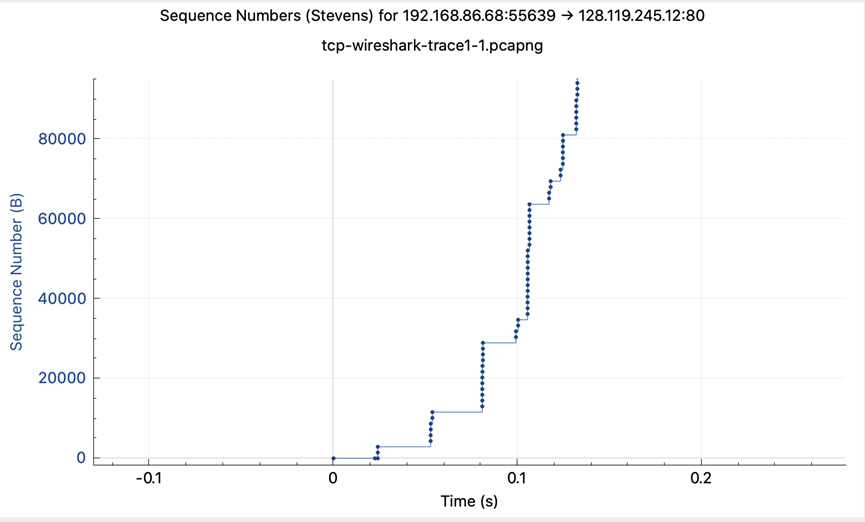
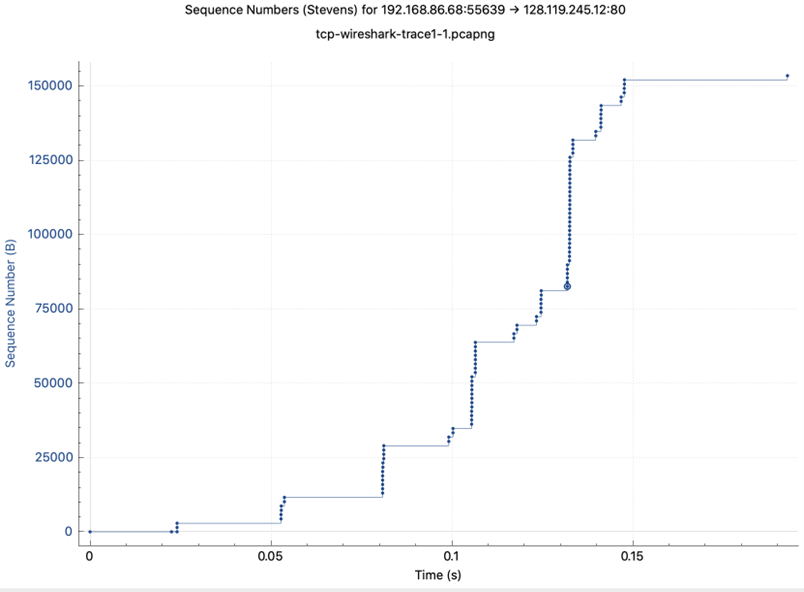
Use the Time-Sequence-Graph(Stevens) plotting tool to view the sequence number versus time plot of segments being sent from the client to the gaia.cs.umass.edu server. Consider the “fleets” of packets sent around t = 0.025, t = 0.053, t = 0.082 and t = 0.1. Comment on whether this looks as if TCP is in its slow start phase, congestion avoidance phase or some other phase. Figure 6 shows a slightly different view of this data.
부분에서 보내는 바이트의 양이 거의 두 배씩 늘고 있습니다. 충분히 TCP Slow start의 모습이라고 볼 수 있을 것 같습니다.
-
These “fleets” of segments appear to have some periodicity. What can you say about the period?
Congestion control의 방법은 최대 cwnd만큼의 데이터가 네트워크를 지나게 하는 것입니다. 주기적인 fleets가 보이는 이유는 cwnd만큼 보낸 후에 ACK이 도착할때까지 기다립니다. 만약 잘 도착했다면 Slow start phase에서는 cwnd를 두 배로 늘리고, timeout이 발생했다면 cwnd를 줄이게됩니다. 이 지연 시간이 RTT입니다.
-
Answer each of two questions above for the trace that you have gathered when you transferred a file from your computer to gaia.cs.umass.edu
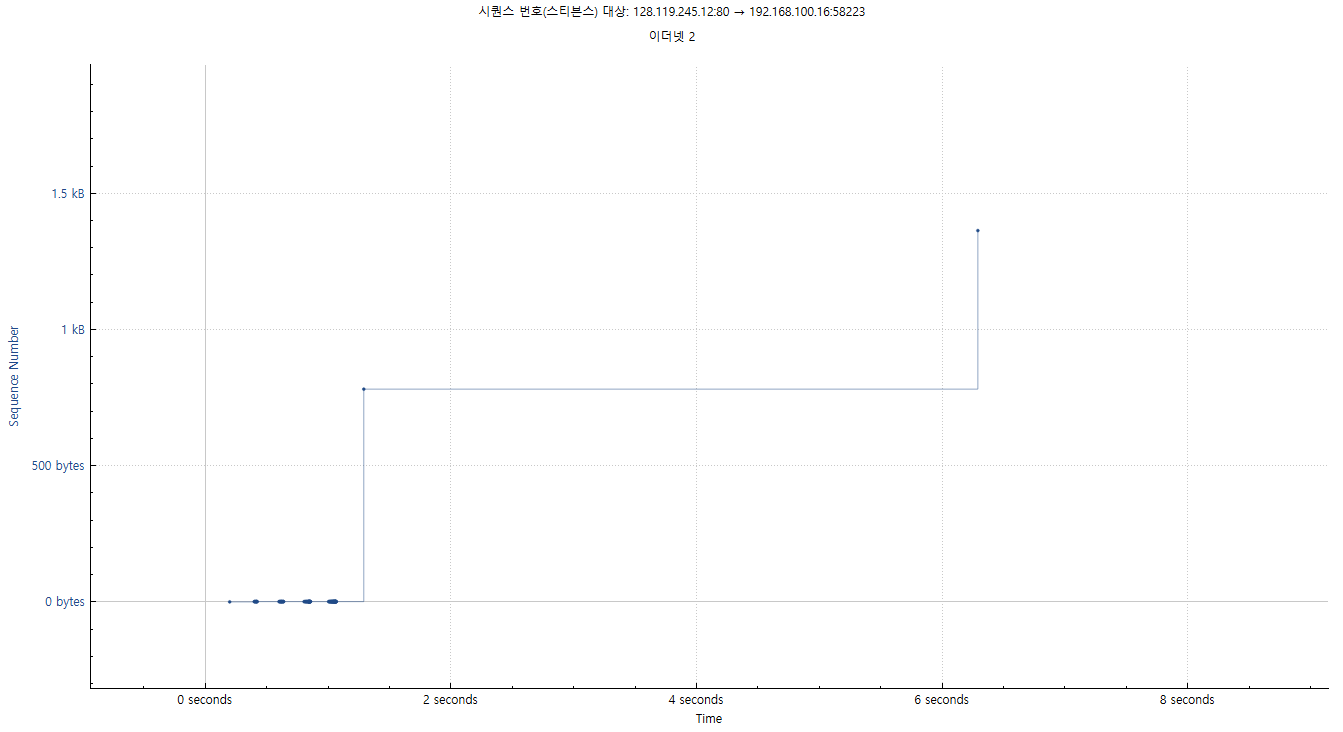
Segment offload때문에 두 번의 세그먼트 전송밖에 안보입니다. NIC가 나눠서 보내긴 했을 것 같습니다. 혼잡 제어는 어쨌건 보낸 바이트 수를 기준을 하기 때문에 충분히 혼잡 제어가 가능할 것 같습니다.